🧩 Services
This section provides a complete overview of all services included in the CogStack-NiFi deployment.
All services run in Docker and interact within a shared internal Docker network.
📊 Overview
Below is a high-level architecture diagram illustrating how CogStack services communicate when all components are enabled:
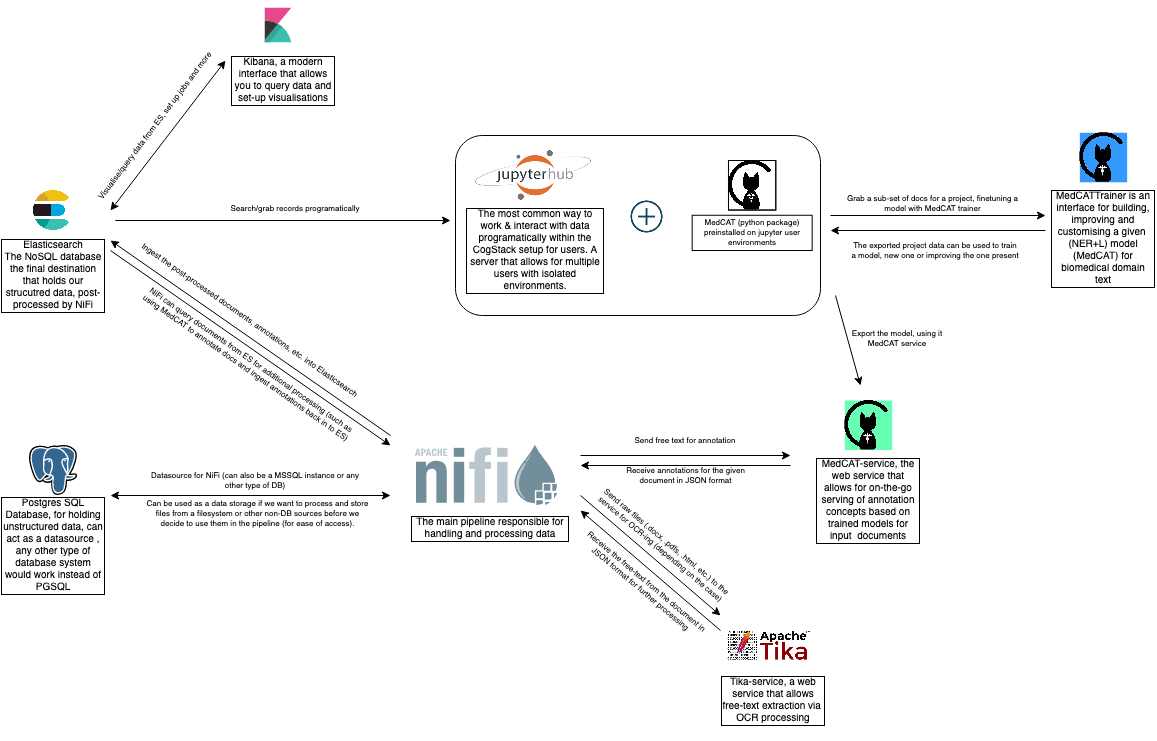
🧩 Primary Services
The core services defined in services.yml include:
samples-db — PostgreSQL database populated with demo datasets.
cogstack-databank-db / cogstack-databank-db-mssql — Production-grade PostgreSQL and optional MSSQL instances.
elasticsearch-1 / elasticsearch-2 / elasticsearch-3 — Multi-node Elasticsearch or OpenSearch cluster.
metricbeat / filebeat — Elastic monitoring and log forwarder services.
nifi — Apache NiFi single-node instance with embedded ZooKeeper.
nifi-nginx — Reverse proxy providing secure access to NiFi.
ocr-service / ocr-service-text-only — High-performance Python OCR and text extraction services.
nlp-medcat-service-production — MedCAT NLP model service with REST API.
medcat-trainer-ui / medcat-trainer-nginx — Web UI and reverse proxy for model training and refinement.
kibana — OpenSearch Dashboards UI.
jupyter-hub — Fully featured data science interface.
git-ea — Self‑hosted Git service (Gitea).
🔐 Note: Important configuration options and environment variables for these services are managed in
services.ymland the associated.envfiles underdeploy/andsecurity/.
🗂️ Service Definitions
All core services are defined in:
deploy/services.yml
They run inside the internal Docker network cognet.
Some services expose ports to the host for convenience.
🗣️ NLP/OCR and other services API Endpoints
Most web ETL & data-enrichment API services that we use will offer thw following endpoints for querying.
GET
/api/infoPOST
/api/processPOST
/api/process_bulk
Useful for NiFi workflows (see workflows.md).
🧬 MedCAT Service
Runs a REST API for model inference uses the MedCAT library which performss clinical concept extraction and linking.
The service has two operation modes:
concept detection: exctracts medical concepts: outputs original text + annotations list.
de-id mode aka. AnonCAT mode, for de-identifying documents: outputs de-identified text + (will output annotations that represent what was de-id in a future version).
Access
https://localhost:5555/api/info- NER container, check if model loads successfullyhttps://localhost:5556/api/info- DE-ID/AnonCAT container
Containers
cogstack-medcat-service-production- for concept NERcogstack-medcat-service-production-deid- for DE-ID/AnonCAT
Service location & files
dir:
/services/cogstack-nlp/medcat-service/docker compose file:
/services/cogstack-nlp/medcat-service/docker/docker-compose.ymlenv: located in
services/cogstack-nlp/medcat-service/env/app.env - controls APP settings (number of cpus used, log level, etc) used by the NER container cogstack-medcat-service-production medcat.env - used by the NER container, controls MedCAT settings directly. app_deid.env - used by the DE-ID container, same app setting control, the main difference being the `APP_DEID_MODE`. medcat_deid.env - used by the DE-ID container, controls MedCAT settings directly
Ports
Service |
External Port |
Internal Port |
|---|---|---|
NER (MedCAT) |
|
|
DE-ID / AnonCAT |
|
|
Models
A default MedMentions
MedMenNER+L model (includes MetaCAT models) is available for public use but needs to be downloaded.To download a model head to the directory of the service
services/cogstack-nlp/medcat-service/scriptsExecute:
bash download_medmen.sh, wait for download to complete.
README
Please check the service’s own README.md
🛠️ MedCAT Trainer
Provides UI workflows for annotation, correction, and iterative model training.
Access
https://localhost:8001
Containers
medcattrainermedcattrainer_nginxmct_solr
Service location & files
dir:
services/cogstack-nlp/medcat-trainer/docker compose file:
services/cogstack-nlp/medcat-trainer/docker-compose-prod.ymlenv:
services/cogstack-nlp/medcat-trainer/envs/env-prod
Ports
external:
8001
README
📚 Jupyter Hub
A multi-user JupyterHub instance deployed via Docker.
Access
https://localhost:8888
Containers
cogstack-jupyter-hubcogstack-jupyter-singleuser-<USERNAME>(per user container started by each user once hub is up)
Service location & files
dir:
services/cogstack-jupyter-hub/docker compose file:
services/cogstack-jupyter-hub/docker/env:
services/cogstack-jupyter-hub/env/jupyter.env
Supports
Per-user containers
CPU/RAM limits (via
services/cogstack-jupyter-hub/env/jupyter.env)Optional GPU support
Notebook image selection
Ports
Component |
External Port |
Internal Port(s) |
|---|---|---|
JupyterHub |
|
|
README
Please check the service’s own README.md file.
🧪 Samples DB (PostgreSQL)
Demo dataset with:
patients
encounters
observations
raw medical reports
cleaned reports
annotation tables
Acess
localhost:5555
Ports
external:
5432internal:
5432
Credentials
user -
test, password -test
🏦 Cogstack databank production DB (Production only: PgSQL, MSSQL)
Empty database for production ingestion pipelines.
Supports both PostgreSQL and MSSQL.
Place schema files inside and they will be loaded instantly on container startup:
services/cogstack-db/<DB_PROVIDER>/schemas/
Where <DB_PROVIDER> can be: mssql,pgsql.
Credentials
PgSQL: user -
adminpassword -adminMsSQL: user -
adminpassword -admin!COGSTACK2022
Access
PgSQL:
localhost:5558→ container5432MSSQL:
localhost:1443→ container1433
Containers
PgSQL:
cogstack-databank-dbMSSQL:
cogstack-databank-db-mssql
Service location & files
docker compose file:
services.ymldir:
services/cogstack-db/env:
security/users/users_database.env- controlers DB user credentialsdeploy/database.env- general DB configs
Ports
Database |
External Port |
Internal Port |
|---|---|---|
PgSQL |
|
|
MSSQL |
|
|
💧 Apache NiFi
Primary ETL/processing engine.
This service is complex and is completely described in this section.
Credentials
Default user: user -
adminpassword -cogstackNiFi
Access
https://localhost:8443 (via nifi-nginx)
Containers
NiFi:
cogstack-nifi
Service location & files
docker compose file:
services.ymldir:
nifi/env:
/deploy/nifi.env- general NiFi settings, JVM memory, etc./security/nifi_users.env- controlers DB user credentials/security/certificates_nifi.env
Ports
Component |
External Port |
Internal Port |
|---|---|---|
NiFi |
|
|
🔎 ELK Stack (Elasticsearch / OpenSearch)
Backend search and indexing engine powering document storage, query, analytics, and NLP output retrieval.
This service is fully described in the Elasticsearch section of the documentation.
The repo supports both:
ElasticSearch (native)
OpenSearch (Amazon fork)
Switch between modes via environment variables in deploy/elasticsearch.env.
🛢️ Elasticsearch / OpenSearch
Credentials
OpenSearch: user -
admin, password -adminElasticSearch: user -
elastic, password -kibanaserver
Access
http://localhost:9200— Node 1http://localhost:9201— Node 2http://localhost:9202— Node 3
Containers
elasticsearch-1elasticsearch-2elasticsearch-3
Ports
all ports need to be exposed via firewall to allow for intercluster communication, we assume 1 different port per node if hosted on the same machine/VM, in production mode all machines can have and use the following ports (if they live on separarate VMs/machines ):
9200,9300,9600internal:
9300,9301,9302,9600,9601,9602,9200,9201,9202external:
9300,9301,9302,9600,9601,9602,9200,9201,9202
Node |
HTTP |
Transport |
Analyzer |
|---|---|---|---|
ES1 |
|
|
|
ES2 |
|
|
|
ES3 |
|
|
|
Service Location & files
docker compose:
deploy/services.ymlconfig:
services/elasticsearch/config/env:
/deploy/elasticsearch.env/security/certificates_elasticsearch.env/security/elasticsearch_users.env
SSL & Certificates
Certificates stored in:
/security/certificates/elastic/<ELASTICSEARCH_VERSION>/
Settings in:
certificates_elasticsearch.env
📊 Metricbeat & Filebeat
Lightweight Elastic stack agents used for monitoring and log forwarding.
They run alongside Elasticsearch to provide observability of the cluster and ingestion pipelines.
Purpose:
Metricbeat — collects system & Elasticsearch metrics (CPU, memory, JVM, node health).
Filebeat — ships container and service logs into Elasticsearch.
Both run as independent containers in the deployment.
Containers
Metricbeat:
metricbeat-1metricbeat-2metricbeat-3
Filebeat:
filebeat-1filebeat-2filebeat-3
Service Location & Files
compose:
deploy/services.ymlconfig:
services/metricbeat/metricbeat.ymlservices/filebeat/filebeat.yml
env:
/deploy/elasticsearch.env/security/elasticsearch_users.env
Ports
No external ports exposed.
All communication occurs internally within the cogstack-net Docker network.
Notes
Elasticsearch must be running before Metricbeat or Filebeat start.
Only Elastic-native Beats are available; OpenSearch-native Beats do not exist.
Authentication/credentials come from
elasticsearch_users.env.
📉 Kibana / OpenSearch Dashboards
Web UI for exploring indexed data, visualising documents, managing index templates, monitoring the cluster, and debugging ingestion pipelines.
Purpose:
Search & browse Elasticsearch/OpenSearch indices
Visualise ingestion outputs and cluster metrics
Manage index patterns, dashboards, and Dev Tools
Validate mappings and test queries used in NiFi flows
Host Access
URL: https://localhost:5601
Credentials
OpenSearch Dashboards:
admin/adminElasticsearch Native:
elastic/kibanaserver
First login setup (OpenSearch Dashboards)
After signing in to OpenSearch Dashboards:
Open the user menu and choose Switch tenant.
Select
Globalso saved objects are shared across users/roles.Go to Stack Management → Workspaces and click Create workspace.
Create a workspace (for example
cogstack-main) in theGlobaltenant.Create data views/dashboards in that workspace.
Private tenant is isolated per user and should be avoided for shared environments.
Containers
cogstack-kibana(OpenSearch Dashboards or Kibana depending on configuration)
Service Location & Files
docker compose:
deploy/services.ymlconfig files:
services/kibana/config/elasticsearch.yml(Elasticsearch)services/kibana/config/opensearch.yml(OpenSearch Dashboards)
env:
/deploy/elasticsearch.env/security/certificates_elasticsearch.env/security/elasticsearch_users.env
Image selection controlled by:
${ELASTICSEARCH_KIBANA_DOCKER_IMAGE}${KIBANA_VERSION}${KIBANA_CONFIG_FILE_VERSION}
Ports
Component |
External |
Internal |
|---|---|---|
Kibana / OpenSearch Dashboards |
|
|
Notes
Must be started after Elasticsearch/OpenSearch
Connects automatically using
ELASTICSEARCH_HOSTSTLS/user settings are applied from the
/securityenv files
🤖 OCR Service
High-performance document text extraction engine replacing legacy Tika for OCR + text processing. In the near future it will be possible to use LLMs/custom models for ocr-ing (pending v2 release, ETA 2026).
The service comes in two variants:
ocr-service — full OCR pipeline (images → text)
ocr-service-text-only — lightweight mode (text extraction only, no OCR)
Both expose a simple REST API.
Purpose:
Extract text from PDFs, images, and scanned documents
Provide OCR via Tesseract (wrapped in optimised Python service)
Provide fast plain text extraction for digital PDFs (text-only variant)
Designed for large-scale throughput within NiFi ingestion pipelines
Access
ocr-service:
http://localhost:8090/api/processocr-seervice-text-only:
http://localhost:8091/api/process
Containers
ocr-serviceocr-service-text-only
Both built from:
cogstacksystems/cogstack-ocr-service:<release>
Service Location & Files
docker compose file:
services/ocr-service/docker/docker-compose.ymlservice directory:
services/ocr-service/logs:
Host:
services/ocr-service/log/Container:
/ocr_service/log/
env files:
deploy/general.env— shared variablesservices/ocr-service/env/ocr_service.env— full OCR configservices/ocr-service/env/ocr_service_text_only.env— overrides for text-only pipeline
Ports
Service |
External |
Internal |
|---|---|---|
ocr-service |
|
|
ocr-service-text-only |
|
|
Both expose the API internally on port 8090.
Please check the service’s own README.md
🗂️ Git-ea
Self-hosted Git instance (Gitea). Lightweight GitHub/GitLab-style service used for hosting repositories inside secure or offline environments.
Purpose:
Internal code hosting for organisations without external Git access
Repository management, issue tracking, wiki, and basic CI hooks
Ideal for notebooks, configs, workflows, and internal project code
Access
URL: http://localhost:3000 (default Gitea port)
Containers
gitea
Service Location & Files
docker compose file:
deploy/services.ymlconfig file:
services/gitea/app.inienv files:
/security/certificates_general.env
Persistent repository data is stored in the volume defined in services.yml.
Ports
Service |
External |
Internal |
|---|---|---|
Git-ea |
|
|
Notes
Supports repository migration from external Git servers
Mirroring available when external access is allowed
Can use CogStack certificates for HTTPS if configured
🧱 NGINX
Note: this component may eventually be replaced by Traefik as the preferred reverse‑proxy and ingress layer for CogStack deployments.
NGINX is used as a lightweight reverse proxy to provide secure, unified access to internal CogStack services.
It handles HTTPS, routing, and access control for NiFi, MedCAT Trainer, and other components.
MedCAT-Trainer has its own nginx instance that runs independently.
Purpose:
Secure external access to internal services
Reverse proxy for NiFi, MedCAT Trainer, and service UIs
TLS termination (optional)
Basic auth / access control where required
Two variants are included:
nginx-nifi — main proxy for NiFi and related services
nginx-medcat-trainer — specialized proxy for MedCAT Trainer
Two variants:
nginx-nifi — main proxy for services
nginx-medcat-trainer — dedicated trainer proxy
Access
Examples (actual paths depend on config):
NiFi:
https://localhost:8443MedCAT Trainer:
https://localhost:8001
Routing rules are defined in the NGINX configuration files.
Containers
nifi-nginx— main proxy for NiFimedcat-trainer-nginx— proxy dedicated to MedCAT Trainer
Service Location & Files
docker compose file:
deploy/services.yml, trainer -deploy/cogstack-nlp/medcat-trainerconfig files:
services/nginx/config/nifi.confservices/nginx/config/medcat-trainer.confadditional templates under
services/nginx/config/
env / certificates:
/security/certificates_general.env/security/certificates_nifi.env
Uses shared CogStack Root CA & NiFi certs (
root-ca.p12,root-ca.key,nifi.key,nifi.pem)
Port
Proxy Target |
External |
Internal |
|---|---|---|
NiFi |
|
|
Notes
Provides HTTPS entrypoints for internal services
Works with CogStack certificate bundle
Trainer uses a separate NGINX instance for routing differences
Modify NGINX configs only if comfortable with its syntax